Hotel Google Reviews: 25+/Month with QR Cards (2026)
How boutique hotels and Airbnb hosts collect 25+ Google reviews per month with nightstand QR cards. Real scan rates, placement data, and what guests actually respond to.
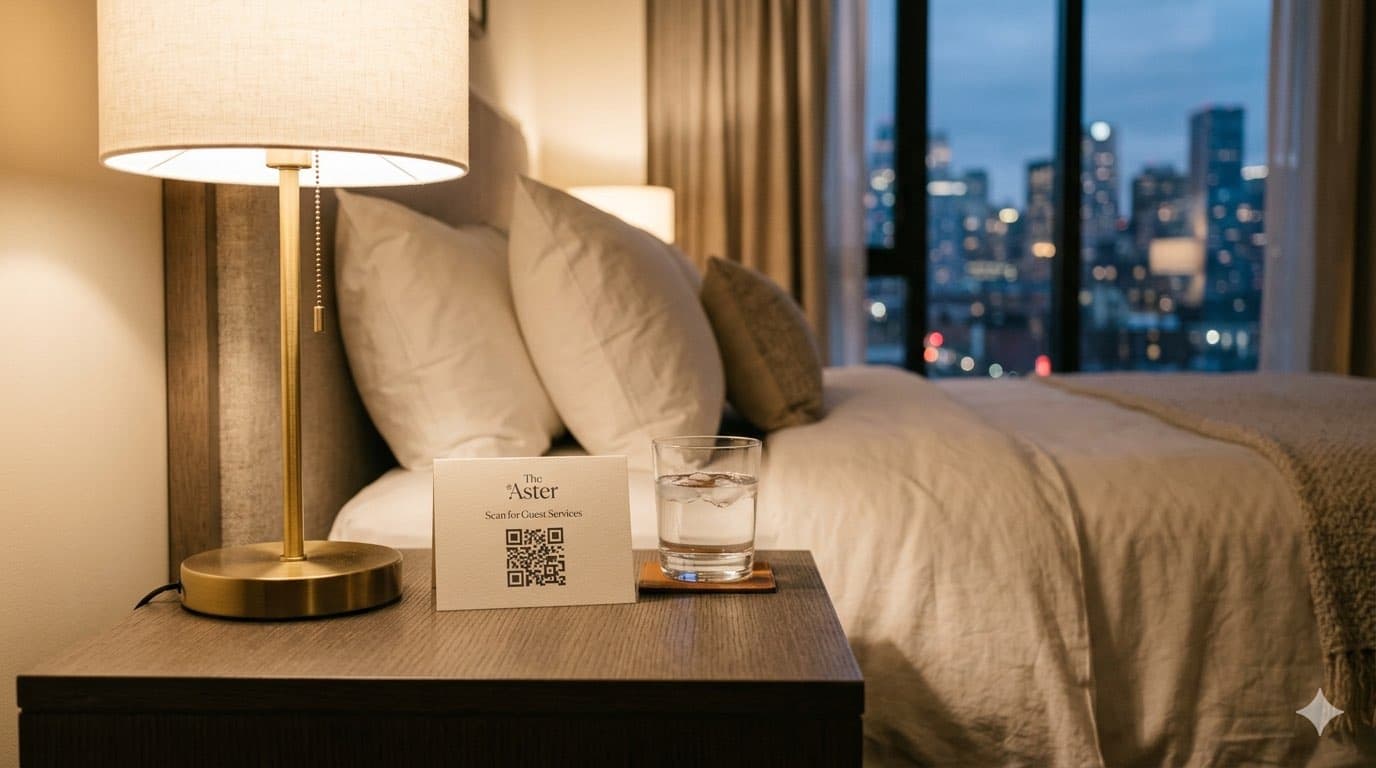
How Hotels and Airbnbs Can Get More Google Reviews with QR Codes
Turn happy customers into reviews
A Google review QR code that gets you more reviews in one scan. Included in every plan.
Get my review QR codeA guest checks into your boutique hotel on a Friday evening. They open the door, see the view, and their shoulders drop. The stress of the week melts away. They take a photo of the room, send it to their partner, and think: "This place is incredible."
That thought never becomes a Google review. Not because the guest did not love their stay — but because by the time they get home, unpack, and return to normal life, the magic has faded. The moment is gone.
This is the core challenge for every accommodation business. 82% of travelers say reviews are extremely important when choosing where to stay, yet the gap between guest satisfaction and actual reviews left is enormous. A property with 95% happy guests might have 30 Google reviews collected over two years.
A QR code placed at the right moment — when the guest is still inside the experience — closes that gap. One scan turns a silent five-star stay into a permanent review that sells your property to the next guest searching "hotels near me" or "best Airbnb in [your city]."
The Booking Decision: Why Accommodation Reviews Carry More Weight
When someone books a hotel room or an Airbnb, they are committing to something deeply personal. They will sleep there. They will be vulnerable — in a strange city, in a bed that is not their own. The decision to trust a property with their comfort, their safety, and often their vacation memories is not taken lightly.
A three-night stay at $180 per night means a guest is spending $540 based largely on what strangers wrote about your property online. That is the reality of hospitality in 2026 — your reviews are your most effective salesperson.
Google's local search algorithm weighs review signals heavily for accommodation queries. When someone searches "boutique hotel in Savannah" or "best Airbnb near downtown Austin," properties with 40+ recent reviews and a 4.5+ star rating consistently appear in the local pack. The property with 120 reviews at 4.8 stars will outrank the one with 15 reviews at 4.6 — even if both properties offer an identical experience.
What makes accommodation reviews uniquely powerful is their specificity. Unlike restaurant reviews that might say "great food," hotel reviews describe rooms, beds, views, noise levels, check-in experiences, and neighborhood walkability. Each review adds a layer of detail that no marketing copy can replicate. A review that says "the room was spotless, the bed was like sleeping on a cloud, and the host left local restaurant recommendations that made our trip" does more selling than your entire website.
And here is the multiplier: listings with a 4.9 star average rating enjoy 10% higher occupancy, 8% higher nightly rates, and nearly 20% more revenue than lower-rated properties. Reviews do not just bring guests in — they let you charge more when they arrive.
The Arrival Wow: Your Highest-Converting Moment
Every accommodation has a moment that defines the entire stay. It happens in the first five minutes.
The guest opens the door. They see the room for the first time — the bed, the decor, the view from the window. If you have done your job well, they exhale. They smile. They pull out their phone to take a photo.
This is The Arrival Wow — and it is the single highest-converting moment for collecting a Google review from an accommodation guest.
The Arrival Wow is strongest in the first 30 minutes after check-in. Place your QR code where guests will encounter it during this window — the welcome card, the nightstand, or the WiFi access card.
Why does this window matter so much? Because the guest is experiencing a dopamine spike. Everything is new, clean, and exciting. The room exceeds expectations. The view is better than the photos. The welcome touches — a handwritten note, a bottle of wine, local chocolates — create genuine delight.
If a QR code is visible during this moment, a percentage of guests will scan it and leave a review right there. Not later. Not after checkout. Now — while the feeling is at its peak.
The second-best window is the morning after arrival. The guest wakes up after a great night's sleep, looks out the window, and thinks: "I'm so glad we picked this place." The nightstand QR code is sitting right there next to their phone.
The worst time to ask? At checkout. Guests are packing, stressed about their flight, and mentally already at their next destination. The magic is over. Any QR code at the front desk during checkout will be ignored.
Hotels vs Airbnbs: Why Google Reviews Matter for Both
If you run a traditional hotel or B&B, the value of Google reviews is obvious — your Google Business Profile is how new guests find you. But if you are an Airbnb host, you might wonder: why do I need Google reviews when Airbnb has its own review system?
The answer is direct bookings.
The Economics of Direct vs Platform Bookings
Every booking through Airbnb costs you the host fee, and your guest pays an additional service fee on top. For a $200/night stay over three nights, the combined platform fees can exceed $100. Over a year with 150+ booking nights, that adds up to thousands in fees.
A Google Business Profile with strong reviews lets guests find you directly. They search "vacation rental in [your city]," find your listing, and book through your own website or by contacting you — no platform fees. The more Google reviews you collect, the higher you rank, and the more direct bookings you capture.
This does not mean abandoning Airbnb. The smartest hosts run both channels — Airbnb for discovery and Google for direct repeat bookings. But the hosts who only collect Airbnb reviews are leaving money on the table. Those reviews live exclusively on Airbnb and do nothing for your Google visibility.
Create a Google Business Profile for your property even if you primarily list on Airbnb. It is free, takes 15 minutes to set up, and starts building your direct booking channel immediately.
Where to Place QR Codes in Your Property
Accommodation has an advantage most businesses do not: your guests spend hours in your space. A restaurant gets 45 minutes. A salon gets 90 minutes. A hotel gets an entire overnight stay — sometimes a week. That means multiple touchpoints, multiple moods, and multiple chances to capture a review.
The Welcome Card (Scan Rate: 10-15%)
A small card placed on the bed or desk, visible the moment a guest enters. Include a brief welcome message, the WiFi password, and the QR code. Guests pick this up within the first five minutes — right during The Arrival Wow.
What works: "Welcome to [Property Name]! We hope you love your stay. If you do, a quick review helps other travelers find us → [QR code]"
The Nightstand Card (Scan Rate: 12-18%)
This is your highest-converting placement. Guests see it when they are relaxed in bed, scrolling their phone. It catches them at two peak moments: the evening wind-down after a great day and the morning wake-up.
The WiFi Access Card (Scan Rate: 8-12%)
Every guest picks up the WiFi card within the first 30 minutes. Print the QR code on the back. They are already on their phone connecting to WiFi — scanning a second code takes two seconds.
The Checkout Area (Scan Rate: 3-5%)
Lower conversion but still worth having. A small sign at the front desk or in the departure instructions. This catches the conscientious guest who wants to leave a review before they leave the property.
The Follow-Up Email (Scan Rate: 6-10%)
Send a thank-you email 24-48 hours after checkout with a direct link to your Google review page. The guest is home, unpacking, and feeling nostalgic about their trip. This is your last-chance touchpoint.
Do This
- ✓Place QR codes at eye level in natural interaction spots
- ✓Include the WiFi password alongside the QR code to guarantee pickup
- ✓Use a warm, personal tone — 'We'd love to hear about your stay'
- ✓Refresh cards regularly so they look clean and professional
Avoid This
- ✕Put QR codes in the bathroom — it feels intrusive
- ✕Ask at checkout when guests are rushing to leave
- ✕Offer discounts or upgrades in exchange for reviews
- ✕Place large signs that feel corporate in a cozy boutique property
Guest Segments: Business vs Leisure vs Couples
Not all guests are the same, and the review you get from each segment tells a different story to a different future booker.
Business Travelers
What they value: Reliable WiFi, quiet rooms, convenient location, fast check-in.
When they review: Business travelers are efficient. If they review at all, it happens during downtime in the evening or while waiting at the airport. The nightstand card and follow-up email work best.
What their reviews say: Practical, detailed, focused on functionality. "Fast WiFi, quiet room, 10 minutes from the convention center." These reviews attract more business travelers.
Leisure Travelers and Families
What they value: Experience, amenities, kid-friendliness, location to attractions.
When they review: After a great day exploring the city. They return to the room, tired and happy, and see the nightstand card. Or after they get home and receive your follow-up email.
What their reviews say: Emotional, story-driven. "Our kids loved the pool and we could walk to everything. Best family vacation we've had." These reviews are gold for attracting similar families.
Couples and Honeymooners
What they value: Romance, ambiance, privacy, special touches.
When they review: The morning after arrival — often the most emotionally positive moment of the trip. Or after checkout when they are feeling grateful for the experience.
What their reviews say: Atmospheric, detail-rich. "The room had a gorgeous view of the harbor, the wine was a lovely touch, and the bed was incredibly comfortable." These reviews sell the experience better than any photo gallery.
If your property serves a specific segment, tailor the welcome card message. A romantic getaway property could say "We hope this stay is as special as the occasion that brought you here." A family-friendly hotel could say "We hope the whole family loves it here."
Turn happy customers into reviews
A Google review QR code that gets you more reviews in one scan. Included in every plan.
Get my review QR codeCase Study: Seaside Haven B&B, Savannah GA
Seaside Haven is a 12-room bed and breakfast in Savannah's historic district. Owner Maria Chen had been running the property for four years with a strong Airbnb presence (4.9 stars, 380+ reviews) but only 18 Google reviews — most of them from the first year when she actively asked guests in person.
"I knew Google mattered, but I hated asking," Maria explains. "It felt awkward to bring it up at breakfast. So I just... stopped."
In September 2025, Maria placed QR codes at three touchpoints: the welcome card on each bed, the nightstand, and the breakfast table tent. She also added a link to her post-checkout email.
The results exceeded her expectations. The welcome card was the top performer — guests scanned it within the first hour. The breakfast table tent caught guests in a relaxed morning mood, writing reviews over coffee. The follow-up email captured the stragglers.
But the biggest impact was financial. As her Google presence grew, more guests found Seaside Haven through Google search and booked directly through her website. Her direct bookings jumped 34% in six months, saving her an estimated $4,200 per month in platform fees.
"The QR codes pay for themselves a thousand times over. I went from 18 reviews to nearly 100 without ever asking a single guest in person. They just scan the card on the nightstand and do it on their own. The direct bookings alone changed my business." — Maria Chen, Seaside Haven B&B
The key insight from Maria's experience: Google reviews for accommodation properties do not just bring new guests — they shift bookings from platform channels to direct channels, where margins are dramatically higher.
The Direct Booking Flywheel
This is the strategic concept that separates properties that grow from properties that plateau. It works like this:
Step 1: Guest has a great stay and scans the QR code → leaves a Google review.
Step 2: More reviews improve your Google ranking for searches like "hotel in [city]" and "best B&B near [landmark]."
Step 3: Higher ranking brings more direct traffic to your Google listing and website.
Step 4: Direct bookings eliminate platform fees, increasing your revenue per guest.
Step 5: Higher revenue lets you reinvest in the guest experience (better amenities, renovations, welcome touches).
Step 6: Better experience → more five-star reviews → the flywheel spins faster.
The Flywheel in Numbers
A 20-room boutique hotel averaging 80% occupancy can generate 25-40 new Google reviews per month with QR codes at every touchpoint. Over 12 months, that is 300-480 reviews — enough to dominate local search for your market. Each percentage point shift from platform bookings to direct bookings adds thousands to your bottom line annually.
This is why Google reviews are not just a "nice to have" for accommodation businesses. They are the engine that drives your most profitable booking channel. Every review compounds. Every direct booking funds a better experience. The properties that start this flywheel earliest win.
Seasonal Review Strategies for Accommodation
Travel is deeply seasonal, and your review strategy should match the calendar.
Summer Peak (June–August)
The highest-volume season for most properties. Leisure travelers, families, and road-trippers flood your rooms. This is your review harvest season — maximize every touchpoint because the sheer volume of guests means even a modest scan rate produces dozens of reviews.
Strategy: Ensure every room has fresh QR code cards. Add a seasonal touch to the welcome card: "Enjoying your summer getaway? We'd love to hear about it."
Holiday Season (November–December)
Guests are traveling for Thanksgiving, Christmas, and New Year. The emotional stakes are high — this is family time, reunion time, celebration time. Reviews written during the holidays tend to be longer, more emotional, and more persuasive.
Strategy: Add the QR code to any holiday welcome touches (gift baskets, seasonal treats). A card that says "From our family to yours — happy holidays" with the QR code on the back feels natural.
Spring Break (March–April)
Families and college groups traveling on a budget. They are price-sensitive and review-dependent — exactly the audience your existing reviews need to persuade.
Strategy: Focus on the follow-up email. Spring break guests are often too busy during their stay to review but respond well to a post-trip "hope you had an amazing break" email with a review link.
Shoulder Seasons (September–October, January–February)
Lower occupancy means every review matters more. Guests during shoulder seasons are often couples or solo travelers seeking quiet getaways — they write thoughtful, detailed reviews.
Strategy: Personalize the welcome card for the season. "The perfect season to explore [city] at your own pace. We hope you love it." Shoulder-season reviews mentioning "quiet" and "peaceful" attract the same segment year-round.
Setup Guide: Ready Before Your Next Guest Arrives
Generate your QR code
Go to reviewqr.app/free-google-review-qr-code, paste your Google review link, and get your QR code in under 2 minutes.
Design your welcome card
Print a card that includes: a warm welcome message, the WiFi password, 1-2 local recommendations, and the QR code with 'Loved your stay? Tell us here.' Keep it on-brand with your property's aesthetic.
Print nightstand cards
A smaller card for the nightstand — just the QR code and a brief line: 'Had a great night? A quick review helps other travelers find us.' Use cardstock that feels premium, not flimsy paper.
Add to your WiFi card
If you use a physical WiFi card (and you should — guests always pick it up), print the QR code on the back with 'Enjoying your stay? We'd love to hear about it.'
Update your checkout email
Add a direct Google review link to your post-stay email template. Send it 24-48 hours after checkout — not immediately. Give guests time to get home and feel nostalgic.
Brief your staff
Front desk and housekeeping should know the cards exist but should not actively push reviews. The system is designed to be passive — the QR codes do the asking for you.
The entire setup takes less than an afternoon. Print the cards, place them in every room, update your email template, and the system runs on autopilot. Every guest who checks in from that point forward encounters multiple opportunities to leave a review — without you ever having to ask.
Expected Results
Based on data from accommodation properties using QR code review systems:
Month 1-2: You will collect 15-25 new reviews. Your Google rating will likely increase as the fresh reviews dilute any older negative ones. You will start appearing in more "near me" searches.
Month 3-4: With 50-75+ total reviews, your property begins appearing consistently in the Google local pack. Direct website traffic increases noticeably. You start seeing bookings from guests who mention finding you "on Google."
Month 5-6: At 100+ reviews, you are in the top tier for your local market. The direct booking flywheel is spinning — platform fee savings are measurable. Competitors with 20-30 reviews cannot keep up.
The compounding effect is real. Unlike auto detailing shops where customers visit once or twice a year, accommodation properties see hundreds of unique guests annually. Each one is a potential review. The volume advantage is massive.
A direct-booking guest is worth far more than a one-time stay. After checkout, include a QR coupon for a return visit in your thank-you email so the guest who just reviewed you books their next trip directly with you instead of through a platform.
Frequently Asked Questions
Should Airbnb hosts also collect Google reviews?
Absolutely. Airbnb reviews only live on Airbnb. A strong Google Business Profile with reviews helps you rank for searches like "vacation rental in [city]" and drives direct bookings — where you keep 100% of the revenue instead of paying Airbnb's 3-5% host fee. Many successful hosts run both channels simultaneously.
Where is the best place to put a review QR code in a hotel room?
The nightstand card consistently delivers the highest scan rates at 12-18%. Guests see it when they are relaxed and settling in, and again in the morning when they wake up happy. The WiFi card and welcome packet are strong secondary placements because guests interact with them within the first 30 minutes of arrival.
When should I ask hotel guests for a Google review?
The two best windows are the morning after arrival — when the excitement is fresh and they have explored the room, the view, and the amenities — and 24-48 hours after checkout via a follow-up email. Avoid asking at checkout itself, as guests are rushing to catch flights or get to their next destination.
Will asking for reviews annoy guests?
Not if done passively. A QR code on a welcome card or nightstand is an invitation, not a demand. Guests who had a great experience will scan it. Those who did not will ignore it. Properties using QR codes consistently report zero complaints about the ask and a 10-15% scan rate among satisfied guests.
How many Google reviews does a small hotel need to compete?
Properties with 40+ recent reviews tend to appear more prominently in local search. The average boutique hotel has 20-30 reviews. Getting to 75-100 puts you in the top tier for your market. With QR codes at every touchpoint, a 20-room property can collect 15-25 new reviews per month during peak season.
Can I use the same QR code for all my rooms and properties?
If all rooms are listed under one Google Business Profile, use one QR code everywhere. If you manage multiple properties with separate Google listings, each property needs its own QR code linking to its specific review page. You can generate all of them at ReviewQR in under 2 minutes each.
Try it on your own customers
Design a single-use QR coupon in 2 minutes, no account needed. Then a 14-day free trial, or buy only the coupons you need, from $3, no subscription.
Design your first coupon →Keep reading
How Busy Cafés Train New Baristas Without Burning Out the Owner
Why your espresso calibration speech happens 9 times a month, the 7 procedures every café actually needs, and how review collection becomes a closing-shift ritual instead of an afterthought.
hospitalityQR Code Coupons for Coffee Shops: Turn Visits Into Regulars
How small coffee shops use a single-use 10% off next visit QR coupon to bring first-time customers back for the second cup and build a regular base.
real-estateReal Estate Google Reviews: QR Code Guide
Collect more Google reviews for your real estate agency with QR codes. Covers closing folders, open houses, business cards, and yard sign strategies.