Google Review QR Code Stand, Sign, Sticker or Poster: Which One, and Where
A Google review QR code gets scanned where customers wait, not where they walk. How to choose between a stand, sign, sticker, poster or plaque, what size to print each one, what to write on it, and the numbers on moving one code three meters.
Google Review QR Code Stand, Sign, Sticker or Poster: Which One, and Where
Turn happy customers into reviews
A Google review QR code that gets you more reviews in one scan. Included in every plan.
Get my review QR codeWalk into almost any small business and you can find the Google review QR code in under five seconds, because it is on the front door. A neat vinyl sticker at eye height, or a printed A4 poster taped to the inside of the window. "Love us? Review us on Google!" It looks right. It is where the hours sign is, where the card logos are, where signage goes.
Now stand next to that door for ten minutes and watch. People coming in are looking for the counter, the menu, or the person they are meeting. People going out are holding a bag, a coffee, a phone, a child's hand, and they are already thinking about the next thing. Nobody stops. The door is a place people move through, and a QR code needs someone to stop, lift a phone, and hold it still.
Three meters away, at the spot where people wait for their order, there is nothing on the counter at all. That is where the customers are standing still, phone already in hand, looking for something to do with their eyes for ninety seconds. The code is on the wrong surface.
The Waiting-Surface Rule
A displayed QR code is not read the way a card handed to someone is read. Nobody is giving it to anyone. It is waiting on a surface for a customer who happens to be in the right state, and that state has three conditions: they are standing or sitting still, at least one hand is free, and their attention has nowhere better to go. Miss any one of the three and the scan does not happen, no matter how good the sign looks.
That gives you a rule simple enough to apply with a tape measure: put the code where customers wait, never where they walk. Walking surfaces are doors, windows, corridors, the wall beside the exit. Waiting surfaces are the pickup counter, the queue line, the table, the chair in the waiting area, the station while a treatment processes.
The payment terminal deserves a special mention, because it is where most counter stands end up and it fails the rule in a sneaky way. The customer is standing still, which looks right. But both hands are busy with a card or a phone that is being used to pay, and their attention is on the amount on the screen. Payment is the least generous ten seconds of any visit. Put the stand where people go after they pay, not where they pay.
This is also why the order of your purchases matters. A handed card will always beat anything on a surface, which the Google review cards article covers in detail. But you still need something on a surface, for the customers staff are too busy to hand a card to, and the difference between a surface that works and one that does not is almost entirely where it stands.
Stand, sign, sticker, poster, plaque: what each one costs
The five objects are not really competing with each other. Each one suits a different kind of surface, lasts a different length of time, and costs a different amount. The table is the whole decision on one screen.
| Object | Typical cost | Lasts | Belongs on | Scan distance |
|---|---|---|---|---|
| Acrylic counter stand | $8 to $20 once, insert pennies | Years (reprint the insert) | Pickup counter, reception desk, waiting-area table | 40 to 60 cm |
| Sticker | $0.10 to $0.50 each | 3 to 12 months, peels | Shelf edges, table corners, chair arms, inside of door | 20 to 30 cm |
| Table tent | $1 to $2 each | Weeks, gets wet and bent | Every sit-down table | 40 to 60 cm |
| Poster or wall sign | $5 to $15 | Months, fades in window light | The wall a queue faces, never the door | 1 to 2 m |
| Plaque (wood or metal) | $30 to $60 | Years | Reception desks where the business is judged on looks | 40 to 60 cm |
Read it and a pattern shows up. The stand and the sticker cover almost every small business, at a total cost of under thirty dollars. The table tent is only for restaurants and cafes with seating. The poster is a niche object that only works on one wall. The plaque is a stand that costs three times as much because it looks nicer, which is a legitimate reason at a dental reception and a poor one at a sandwich counter.
Now put a value on what the object is for. Say the stand in the right spot produces around a dozen reviews a month (the worked example below shows where that number comes from). Over a year that is roughly 150 reviews from a fifteen dollar object, about ten cents a review. The same money spent on a door poster, in a spot that produces two a month, is closer to sixty cents a review, and the poster needs replacing when the sun bleaches it.
The asymmetry that makes this work
The object is almost free. The surface is what you are really choosing, and the wrong surface costs you nothing on the invoice and most of your scans in practice. A $15 stand on the pickup counter and a $15 poster on the door cost the same. One produces around 12 reviews a month, the other around 2. Add a take-one coupon pocket to the stand and the same fifteen dollars also brings people back: a customer who drifts in 3 times a year at $8 is worth $24, one who comes in 20 times is worth $160, and moving them there costs about 3 redeemed coupons at $3, or $9. That is $136 of annual value for $9, roughly 15 to 1, from the same square of counter.
Three ways to put a coupon beside the code
A review QR asks the customer for something. A coupon gives them something. The surfaces where people wait are exactly where both jobs work, and the object you just bought for the review code has room for the other one. The rule that runs through all three plays: the two sit side by side, never cause and effect. A coupon handed in exchange for a review breaks Google's policy. A coupon handed because someone visited is just good business.
Play 1: The Two-Face Stand
Job: Make one counter stand do both jobs without linking them.
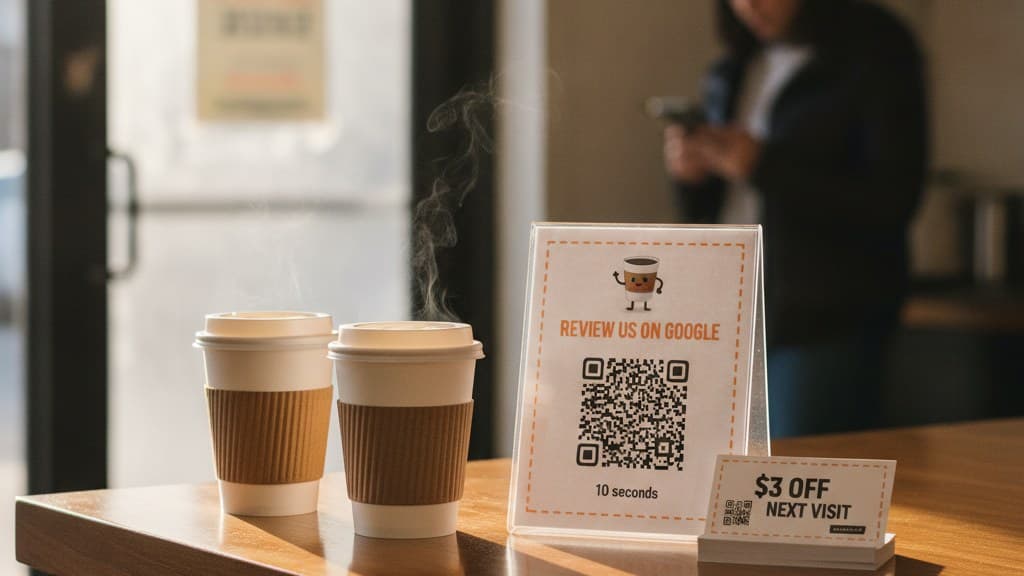
Buy an acrylic stand with a slot or a small card pocket (most sign holders sold for menus have one). The front insert carries your review QR and one line of copy. The pocket holds a stack of business-card-sized comeback coupons: three dollars off, valid twenty one days, one use per code, with a line that says "Take one. Thanks for coming in." No mention of reviews anywhere near the coupon.
People waiting pick things up. A take-one card redeems at a lower rate than a card handed by a person, typically somewhere around one in eight, but it runs without any staff time at all, and it reaches the customers your team was too busy to talk to.
Offer shape: $3 off next visit, 21 day expiry, single-use, in a take-one pocket. Best placed: On the pickup counter or the waiting-area table, beside the review QR. Why it works: The waiting customer's attention is already on the stand for the review code, so the coupon gets read at the same moment for free, and neither one is conditional on the other.
Play 2: The Outside-In Poster
Job: Give the door and the window a job they can actually do.
The door is the wrong place for a review code for a second reason beyond foot traffic: a lot of the people who see it have not bought anything yet. A passer-by has nothing to review. They do, however, have a reason to come in for the first time. So take the review QR off the window and put a first-visit coupon there instead: "$3 off your first visit, scan to claim, this month only." Then move the review code inside, to a waiting surface.
Offer shape: $3 off a first visit, valid for the current month, single-use codes. Best placed: Window or door, facing the street, at eye height. Why it works: It matches each surface to the audience actually standing in front of it. Walkers outside get a reason to enter. Waiters inside get the review ask.
Play 3: The Pickup-Shelf Sticker Pair
Job: Cover the busiest waiting spot with the cheapest object you can buy.
At a pickup shelf, a takeaway counter or the edge of a bar, there is often no room for a stand. Two stickers fit anywhere: the review QR on the shelf edge at the spot where people put their hand while they wait, and a small line underneath saying "Ask for this week's comeback card." Staff hand the coupon card with the order when it comes up, so the handoff is personal and the redemption rate climbs back toward the one in four or better you get from a handed card.
Offer shape: A handed $3 comeback card, 14 to 21 day expiry, given with the order. Best placed: Shelf edge or counter lip where orders are collected. Why it works: The sticker catches the idle ninety seconds, and the handed card catches the customer at the moment their order arrives, which is the warmest second of the visit.
Do This
- ✓Put every review code on a surface where people stand still
- ✓Keep the coupon and the review ask side by side but unconnected
- ✓Use fixed amounts off with a short, printed expiry
- ✓Print the coupon codes single-use so a photo cannot circulate
- ✓Check scan counts per surface after two weeks and move what is not working
Avoid This
- ✕Don't put the review QR on the outside of the door or the window
- ✕Don't stand the review code next to the card terminal
- ✕Don't write anything about stars or ratings on the sign
- ✕Don't offer a coupon in exchange for leaving a review
- ✕Don't laminate with gloss, it throws glare into the camera
Five surfaces where people actually wait
Every business has three or four places where customers stand still. Finding them takes one quiet ten minutes of watching where people stop. These are the five that come up in almost every small business, roughly in order of how often they work.
The pickup point, not the register
In any business where people order and then wait, the pickup counter is the best square of surface you own. The customer has paid, their hands are free, they are facing the counter, and they have between one and four minutes with nothing to do. A stand here, angled up toward standing eye height at about 30 degrees, beats the same stand beside the terminal by a wide margin. If the pickup point and the register are the same place, put the stand on the side of the counter where people step after paying.
The queue line at chest height
If people queue, they face something for a minute or more: a pillar, a rail, a menu board, the side of a fridge. That is the one place a poster or wall sign earns its keep. Mount it between 1.2 and 1.5 meters from the floor, where a phone held naturally in a standing hand will frame it without the customer having to reach up. A code above head height is scanned by nobody.
The table, at the corner nearest the seat
For sit-down tables, a table tent or a corner sticker works because the meal has natural pauses: the wait for food, the wait for the bill. Put it at the edge closest to a chair, not in the middle next to the salt, where it gets moved, stacked and covered. One per table. A single code on a shared condiment station is not a table placement, it is a wall sign lying down.
The waiting chair and the processing station
Appointment businesses have a different kind of wait: the waiting-room chair, and the twenty minutes while color processes or a car is on the lift. A small stand on the side table between waiting chairs, or a sticker on the arm of the chair, sits exactly where a bored hand already holds a phone. At a salon station, a sticker on the edge of the mirror frame catches the client looking at their own result, which is the best mood they will be in all visit.
The inside of the exit door, at hand height
This is the one door placement that works, and it is the opposite of the usual one. Inside the door, facing out, at the height of the handle. The customer pauses there for a second to push or pull, often with a free hand, and they are a customer who has just finished a visit rather than a stranger walking past. It will never be your best surface, but it is a useful last catch for people who skipped the others.
Notice what is missing: the outside of the door, the shop window, the wall beside the entrance, the ceiling-height banner. None of those are waiting surfaces, and one of them faces people who are not yet customers. If you want to use them, give them the job in Play 2 and let them hand out first visits instead.
Turn one visit into many
Hand out single-use QR coupons that pull customers back through your door. Part of your Customer Comeback System. 14-day free trial, cancel anytime.
Create a couponSizes and words for each object
A code that is too small for its distance fails silently. The customer lifts the phone, the camera hunts for a second, and they give up before you ever know they tried. The fix is a single rule: the QR should be at least a tenth as wide as the distance it is scanned from. Then give each object a word budget, because every extra word competes with the code for the same two seconds of attention.
| Object | Scanned from | Minimum QR width | Word budget | Example copy |
|---|---|---|---|---|
| Sticker | 25 cm | 2.5 cm (1 in) | 3 to 4 | "Review us on Google" |
| Counter stand | 50 cm | 5 cm (2 in) | 8 to 10 | "Enjoyed it? Scan to review us on Google. 10 seconds." |
| Table tent | 50 cm | 5 cm (2 in) | 8 to 10 | "While you wait: review us on Google. 10 seconds." |
| Plaque | 50 cm | 5 cm (2 in) | 6 to 8 | Business name, then "Review us on Google" |
| Poster | 1 to 2 m | 10 to 20 cm (4 to 8 in) | 6 max | "Scan to review us on Google" |
Three print details decide whether any of these scan:
- The quiet zone. Leave a white margin around the code at least four of its little squares wide. Designers love to crop it tight against a border or a logo. The camera needs that margin to find the edges.
- Matte, not gloss. Glossy lamination and shiny acrylic throw overhead lights straight back into the lens. If your stand is glossy, put the insert behind it rather than printing on its face, and tilt it slightly away from the nearest ceiling light.
- Dark on light. Black or very dark navy on white. Inverted codes (light on dark) and low-contrast brand colors fail on older phones, and a customer who tries once and fails does not try twice.
One more thing a template will never tell you: what is inside the square matters more than any of this. A code that opens your Maps listing instead of the review box loses more than half its reviews at the last step. If you have not checked which link your code carries, how to get a QR code for Google reviews walks through the four possible Google URLs and which two to use.
One code, moved three meters
A cafe with about 1,200 customers a month. Eight dollar average ticket. One review QR code, the correct link inside it (it opens the review box directly), and roughly 40 percent of people who scan it finishing a review. Nothing changes between the two versions except where the code sits.
Version one: the door sticker and the terminal stand. All 1,200 customers pass the door. Walking, carrying, looking elsewhere, about one in three hundred scans it: 4 scans. The stand beside the card terminal does a bit better, since people are at least standing still, but their hands and attention are on paying: around one in a hundred, 12 scans. Sixteen scans in total, and at 40 percent completion about 6 reviews a month.
Version two: the same code, moved to the pickup counter and the queue. The door sticker comes off and a first-visit coupon goes up instead. The stand moves three meters, from the terminal to the pickup counter, where people wait about two minutes for their drink with free hands. Around one in thirty-five scans it there: 34 scans. A poster at chest height on the pillar the queue faces adds another 6. Forty scans, and at 40 percent completion about 16 reviews a month. Same code, same stand, same fifteen dollars.
The coupon pocket runs alongside it without touching the review numbers. About one in eight people waiting at the pickup counter picks up a take-one card, so 150 cards a month, and roughly 12 percent of those come back inside the three weeks: 18 return visits, $144 billed for $54 of discount. Staff handing a card with the order instead of relying on the pocket would roughly double that, which is why Play 3 exists.
These rates are deliberately conservative, and you will see much bigger numbers quoted for signs elsewhere. Most published scan rates for displayed codes are not wrong so much as vague about the denominator: scans per customer who sat at the table for an hour is a very different number from scans per person who walked past. Measure your own. Put one tracked code on each surface for two weeks and compare the counts. The ranking between surfaces is what matters, and it is almost always the same: waiting beats walking.
The one sentence that makes a stand work
A stand on a waiting surface will collect scans on its own. A stand that someone on the team points at once, in passing, collects a lot more, because a customer who has been told where to look does not have to discover it. The mention has to be short enough to say while doing something else, and it must never ask for a rating.
Bad version (asks for a rating, which Google does not allow, and sounds like a demand): "If you liked it, please leave us a five star review on the sign over there, it really helps!"
Good version (points at the stand while they wait, eight words): "While you wait, the code's there. Ten seconds."
It works because it lands in the right moment (the customer is now waiting, with nothing to do), it points to a place rather than making a request, and "ten seconds" answers the only objection a waiting customer has, which is how long it will take. Say it when you take the order, not when you hand it over, so the customer has the whole wait to act on it.
Setting up your first stand in 6 minutes
Create your review QR (14-day free trial)
Build and preview your Google review QR code at reviewqr.app. Downloading the print files and tracking scans starts with a fourteen day free trial (card on file, cancel any time). After the trial, Essentials is $10/month for 100 single-use coupons and Growth is $25/month for 500. Both include the review QR code.
Spend ten minutes finding your waiting surface
Watch where customers stop during a normal busy half hour. Note every spot where someone stands or sits still for more than thirty seconds with a free hand. The one with the most people and the longest wait is where the stand goes. It is almost never where your current sign is.
Download the SVG and size it by distance
Use the SVG file, which stays sharp at any size. Size the code to at least a tenth of the scanning distance: 5 cm for a counter stand, 2.5 cm for a sticker, 10 cm or more for a poster. Keep the white margin around it and print on matte paper.
Write within the word budget
Business name, then one line: 'Enjoyed it? Scan to review us on Google. 10 seconds.' Nothing about stars. Nothing promised in return. If you are adding the Two-Face Stand, the coupon cards go in the pocket with their own line ('Take one. Thanks for coming in.') and no mention of reviews.
Set up the comeback coupon batch
Create a coupon campaign: $3 off, 21 days, single-use. Print 100 cards on business card stock for the pocket or for staff to hand with orders. Once a code is scanned and marked redeemed at the counter, a second scan of the same code shows it as already used.
Teach one sentence and check back in two weeks
Everyone who takes orders says 'While you wait, the code's there. Ten seconds.' In two weeks, compare scan counts per surface in your dashboard. If a surface is producing almost nothing, move the object, not the wording. Surface beats copy every time.
Common review QR sign mistakes
Mistake 1: Putting the code on the front door. It is the default because it is where signs go, and it is the worst surface in the building. People walk through it in two seconds with full hands, and a share of them have not bought anything yet. Give the door a first-visit coupon instead and move the review code to where people wait.
Mistake 2: Standing it next to the card terminal. The customer is standing still, which looks promising, but both hands are busy and their attention is on the total. Move the stand to where people step after they pay. It is usually less than a meter away and makes a large difference.
Mistake 3: Sizing the code for the design, not the distance. A pretty two centimeter code on a poster read from across the room is decoration. Use the one-tenth rule, keep the white margin, and test it yourself with an older phone from where the customer will actually stand.
Mistake 4: Glossy finishes under ceiling lights. Shiny lamination and glossy acrylic throw a white glare patch right across the code at exactly the angle a standing customer holds their phone. Print matte, and if the stand itself is shiny, tilt it away from the nearest light.
Mistake 5: Asking for five stars or trading anything for a review. "Leave us a 5-star review" breaks Google's rules on soliciting a specific rating. "Review us and get $3 off" breaks the rule on incentivised reviews. Either can get reviews filtered or removed. Ask for a review, full stop, and if you hand out coupons, hand them to everyone, with no condition attached.
Mistake 6: Never moving it. A sign that has stood in the same place for eight months becomes invisible to your regulars, and you have no idea whether its spot was ever right. Track each surface separately, compare after two weeks, and move whatever is underperforming. The object is cheap. The surface is the thing you are testing.
Related reading
If a surface is only your backup, the main tool is a card placed in someone's hand, and Google review cards with a QR code covers sizes, copy and the handed-card effect. Before you print anything, check which link your code carries with how to get a QR code for Google reviews. If you are weighing a tap stand for the counter, Google review tap card vs QR code explains why unattended tap stands underperform. For the coupon side, QR coupons for small business explains the mechanic from scratch, the coupon ideas listicle groups twenty three offers by the problem they solve, and best QR coupon app for small business compares the tools side by side.
Frequently asked questions
Where is the best place to put a Google review QR code?
Wherever your customers stand still with a free hand and nothing else to look at. In a cafe that is the pickup counter where people wait for their drink, not the register where they pay. In a salon it is the side table next to the waiting chairs or the station while color processes. In a repair shop it is the waiting room, not the door. The single worst place is the one most businesses choose first: the front door or the window, which is read for about two seconds by people who are walking, and half of whom have not bought anything yet. Move the same code from the door to the spot where people wait and it will typically be scanned several times as often, at no extra cost.
What size should a Google review QR code be on a sign or stand?
Use the distance rule: the QR should be at least one tenth as wide as the distance it will be scanned from. A sticker read from 25 cm needs a 2.5 cm code, about one inch. A counter stand read from 50 cm needs 5 cm, about two inches. A poster read from a meter away needs 10 cm, about four inches. Leave a white border around the code (the quiet zone) at least as wide as four of the little squares in its pattern, and print on matte stock, because glossy lamination throws light back into the camera and turns a two second scan into a ten second one.
Should I use a stand, a sign, a sticker, or a poster?
Pick the object by the surface, not the other way round. An acrylic counter stand suits any flat surface where people wait at waist height and costs around ten to twenty dollars once. A sticker suits surfaces that already exist in the waiting spot: a pickup shelf edge, a table corner, a chair arm, the inside of the exit door. A table tent suits sit-down tables. A poster only makes sense on a wall people face while queuing, and a plaque is a durable version of a stand for a reception desk. Most small businesses need one stand and a sheet of stickers, and nothing else.
What should a Google review sign say?
Fewer words than you think, and never anything about stars. A good stand says who is asking, what to do, and how long it takes: your business name, then something like "Scan to review us on Google, ten seconds". A poster read from across a room gets six words at most. A sticker gets three or four. Do not write "leave us a 5-star review", because Google does not allow businesses to ask for a specific rating, and do not promise anything in exchange for a review, because trading a reward for a review breaks Google policy and can get reviews filtered.
Can I put a coupon on the same stand as my review QR code?
Yes, as long as the two are independent. A stand can carry the review QR on its face and hold a small stack of take-one comeback coupons in a slot or a card holder next to it. The review ask stands on its own and the coupon is an unconditional thank-you for visiting. What you must not do is connect them: no "review us and get $3 off", no coupon handed only after the customer shows you a review. That is incentivised reviewing, it breaks Google policy, and it risks your reviews being removed. Keep them side by side, never cause and effect.
Is a Google review QR code for a stand free?
You can build and preview a Google review QR code for free on ReviewQR in about thirty seconds. Downloading the print files (high resolution PNG and SVG, which scale from a sticker to a poster), tracking scans, and running single-use QR coupons need a plan. Every plan starts with a fourteen day free trial (card on file, cancel any time), which is long enough to print a stand, put it in the right spot and see real scan counts. After that, Essentials is ten dollars a month for one hundred single-use coupons and Growth is twenty five dollars a month for five hundred, and both include the review QR code.
Try it on your own customers
Design a single-use QR coupon in 2 minutes, no account needed. Then a 14-day free trial, or buy only the coupons you need, from $3, no subscription.
Design your first coupon →Keep reading
Small Business Loyalty Program: No App, No Points, Just a Coupon
Every loyalty program charges the customer an enrollment tax before it can reward anything, and only your regulars ever pay it. The math on what that costs, and the three-play coupon system that replaces it, with placement geometry and a counter script.
guidesGoogle Review Tap Card vs QR Code: Cost, Setup, and What Customers Actually Do
An NFC tap card converts better than a QR code at the counter and worse everywhere else. The honest numbers on cost per review, phone compatibility, and which one earns the return visit.
guidesHow to Get a QR Code for Google Reviews (and the Link That Makes It Work)
Getting the QR code takes two minutes. Getting the right Google link takes longer, and it is the part that decides whether scans turn into reviews. Three methods, the four URLs people confuse, and the math on what a broken link costs.