Google Review Tap Card vs QR Code: Cost, Setup, and What Customers Actually Do
An NFC tap card converts better than a QR code at the counter and worse everywhere else. The honest numbers on cost per review, phone compatibility, and which one earns the return visit.
Google Review Tap Card vs QR Code: Cost, Setup, and What Customers Actually Do
Turn happy customers into reviews
A Google review QR code that gets you more reviews in one scan. Included in every plan.
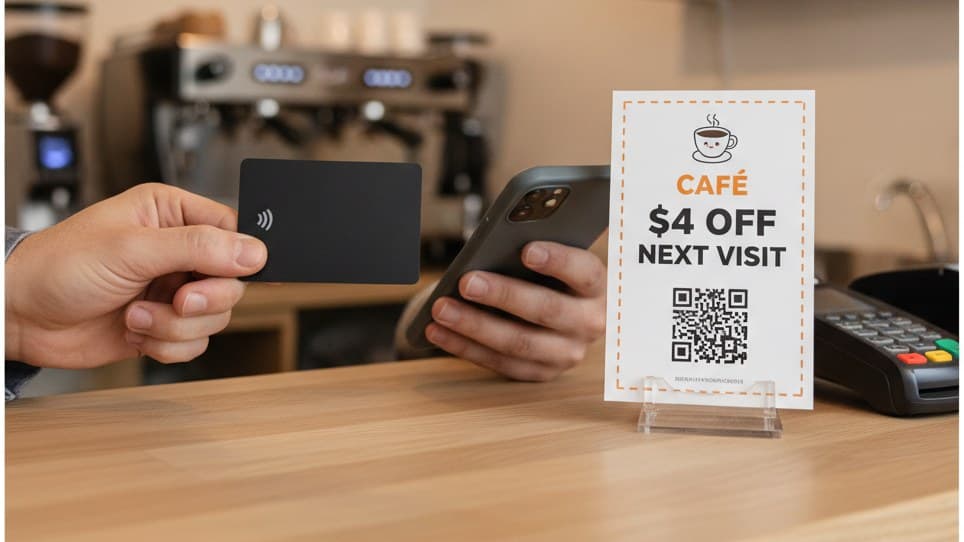
Get my review QR codeA tap card arrived in the post two weeks ago. Black plastic, your logo on it, the Google G in the corner, thirty-odd dollars including shipping. It looked like the answer, because the pitch is genuinely good: no camera, no aiming, no app, the customer just touches their phone and the review page opens.
Then you watched your Saturday person try to use it. She asked the customer to unlock his phone. He did, then held it flat on the counter. She moved the card around the back of it, first the middle, then the top, then the middle again. Nothing happened for four or five seconds, which is a long time when two people are standing still watching a piece of plastic. He said "it's fine, I'll do it later." He did not do it later.
That scene is not an argument against tap cards. Tap cards work, and when the handoff goes cleanly they convert better than a printed QR code does. It is an argument about where the technology puts the work. An NFC tag needs a hand, a staff member, an unlocked phone, and about one centimeter of clearance. A QR code needs a camera at arm's length and nobody's help. That single difference decides which one belongs in your business, and for most businesses the honest answer is one of each.
The Arm's-Length Rule
NFC is a near-field technology, and "near" is not a figure of speech. The tag and the phone antenna have to be within roughly one to four centimeters, and in practice that means contact. A QR code is read by a camera, which works comfortably at forty to sixty centimeters and will still resolve a well-printed code from across a table.
Write those two numbers next to each other and the whole comparison falls out of them.
At one centimeter, somebody has to close the distance. That somebody is almost always your staff member, holding the card, asking the customer to unlock their phone, finding the right spot on the back of it. When that person does the job well, conversion is excellent, because the customer never has to decide anything. The decision has already been made for them by a human standing there being helpful.
At sixty centimeters, nobody has to close anything. The code can sit on a card in a palm, a sticker on a door, a bill folder, the top of a takeaway bag, a receipt. It works on a Tuesday at 3pm when the one person on shift is dealing with a delivery. It works on an order that left the building in a paper bag and got opened in somebody's kitchen. It works when the customer is sitting down and you are nowhere near them.
That is the Arm's-Length Rule, and it is the whole decision: NFC buys you conversion inside one centimeter and gives up every surface beyond it. You are not choosing a better technology. You are choosing whether your review ask needs a person attached to it.
The corollary is worth stating plainly, because most comparison articles on this topic will not: if every one of your review asks happens face to face at a counter, and your team will genuinely run the handoff on every shift, a tap card is the better instrument and you should buy one. The problem is that "every ask, every shift" describes far fewer businesses than the people selling tap cards imply.
What each one costs per review
Both options are cheap. That is the first thing to get out of the way, because the cost conversation is usually where these comparisons go to die, and neither number is big enough to matter on its own.
A tap card is a one-off. Call it $30 delivered, maybe $50 if you buy two so the second counter is covered and there is a spare when one goes missing. There is no per-scan fee and no reprint, and a card that survives a year of counter use has amortized itself into nothing. If a single card produces fifty reviews across its first few months, you are at well under a dollar a review and falling.
Printed QR cards are a recurring six cents each. Two hundred and fifty cards land between $12 and $20 at any local print shop, which is about $18 a month for a counter business that hands one to everybody. At a 30 percent scan rate and 40 percent completion, that box produces roughly thirty reviews, so around $0.50 per review.
So the tap card is cheaper per review, and anybody who tells you otherwise is selling something. The question is what each dollar buys besides the review.
The asymmetry that decides this, and it is not the price
A tap card produces reviews and nothing else. It stays behind the counter, it holds exactly one destination, and the customer leaves with nothing in their pocket. A printed card produces reviews and goes home, which means the back of it can carry a single-use coupon. One re-engaged customer at a $12 ticket coming back twice a year is $24 of billed revenue against about six cents of cardboard and a few dollars of discount. Across 300 cards that is roughly 10 to 1, and it is revenue the tap card has no mechanism to reach.
This is the part that gets missed. Reviews are a visibility asset: they change how often a stranger picks you out of the map pack, and that effect is real but slow and hard to attribute. A return visit is revenue with a date on it. The printed card can do both jobs on one piece of cardboard because it has two sides and it leaves the building. The tap card can do one job, very well, in one place.
Three ways businesses actually deploy them
Three patterns show up repeatedly. They are not mutually exclusive, and the third is what most businesses settle into after a couple of months.
Pattern 1: The staff-held tap card
What it is: One or two NFC cards kept in an apron pocket or clipped to the terminal, brought out at the payment moment by whoever did the work.
Who it reaches: Customers who pay face to face, during staffed hours, when the person serving them remembers.
Why it works: The customer makes no decisions. They do not aim a camera, they do not judge whether the code will work, and they do not have to want it enough to act. The staff member supplies all the intent. This is why conversion per attempt is high, and it is also exactly why the card is useless on a shift where nobody picks it up.
Pattern 2: The counter tap stand
What it is: An NFC stand or plaque parked next to the card terminal, usually with "tap for reviews" printed on it, left for the customer to use unprompted.
Who it reaches: Almost nobody, and this is the pattern to be careful about. An unattended tap stand is worse than an unattended QR stand, because a QR code is a universally understood instruction while a tap target requires the customer to know that their phone does this, know where their antenna is, and be willing to press their phone against shop furniture. Buy a tap stand if a person is going to operate it. Do not buy one as signage.
Why it underperforms: Every tap card review you have ever heard about came from a staffed handoff. Remove the staff and you have removed the mechanism.
Pattern 3: The tap card plus the printed comeback card
What it is: The tap card handles the review ask at the counter. A printed double-sided card handles everything else: review QR on the front, single-use coupon QR on the back, handed to first-timers and lapsed regulars, dropped in bags, tucked into bill folders.
Who it reaches: Everybody the counter reaches, plus everybody it does not.
Why it works: The two tools stop competing once you notice they are aimed at different problems. The tap card maximizes reviews from the moment you already control. The printed card extends your reach past that moment and carries the only thing that brings the customer back. Combined cost is roughly $30 once plus $18 a month.
Do This
- ✓Point the tag at the Google review composer, not at your Maps listing
- ✓Test the card on one iPhone and one Android before it goes on the floor
- ✓Keep the tap card in a hand, not on a stand
- ✓Give the customer something printed to take home as well
- ✓Use a trackable link so you can tell which shifts are running it
Avoid This
- ✕Don't buy a card whose link is locked behind a vendor subscription
- ✕Don't ask for a specific star rating on the card or in the script
- ✕Don't offer anything in exchange for a review (Google filters them)
- ✕Don't assume every customer's phone can tap
- ✕Don't rely on a tap card for orders that leave without a face-to-face moment
The phone compatibility nobody mentions in the listing
Product pages for tap cards say "works with all modern smartphones." That is broadly true and quietly misleading, because the failure modes are not about the phone model. They are about the state the phone is in when you bring the card to it.
| Condition | iPhone | Android |
|---|---|---|
| Background tag reading | XS and newer, no app needed | Most mid and high-end phones |
| Screen must be on + unlocked | Yes | Yes |
| NFC can be switched off | No, it is always on | Yes, and often is on budget handsets |
| Antenna location | Top edge of the back | Center or upper back, varies by model |
| Hardware may be missing | No, all supported models have it | Yes, some budget handsets ship without |
Read that table as a list of four things that have to be true simultaneously at the counter, in front of a customer who is mildly impatient. Most of the time they are. When one of them is not, the recovery is awkward in a way a failed QR scan never is, because the customer cannot see what is wrong. A QR code that does not scan gets tried again from a different angle. A tap that does nothing just looks broken.
The antenna position is the single most common cause of a tap that "does not work." On iPhone the reader sits at the top of the back of the phone, near the cameras, and staff instinctively aim for the middle because that is where the card looks like it should go. Brief your team on this one detail and a noticeable share of your failures disappear. On Android, tell them to try the center first and then slide upward.
The practical rule: if a tap does not register within about three seconds, stop and hand over a printed card instead. Do not keep moving the plastic around. Three seconds of failure reads as a hardware quirk. Ten seconds reads as an imposition, and the customer's polite willingness is gone for the rest of the visit.
Turn one visit into many
Hand out single-use QR coupons that pull customers back through your door. Part of your Customer Comeback System. 14-day free trial, cancel anytime.
Create a couponWhere each one lives in the room
The placement question answers itself once you accept the Arm's-Length Rule. The tap card goes wherever a person is. The printed code goes wherever a person is not.
Tap card: the apron pocket of whoever did the work
Not a drawer, not a shelf under the till, not the manager office. The card has to be within reach of the hand that will use it, on the body of the person the review is going to be about. A stylist, a groomer, a tech, or the barista who remembered the order gets a noticeably better response than whoever happens to be on the register, because the customer is being asked about them specifically.
Tap card: clipped to the payment terminal
The second-best home, and the right one for businesses where the register is shared. It keeps the card in the exact half-metre where the handoff happens and stops it walking off. Clip it so the card can be lifted and brought to the phone, rather than fixing it flat to the terminal where the customer has to press their phone against a machine they are nervous about touching.
Printed QR: into the palm with the receipt
For every customer the tap card missed, which on a normal week is most of them. The payment moment is the one point in the visit where the customer is standing still, facing you, with a hand already out. The card goes over in the same motion as the receipt, not before it, and not after they have started to turn away.
Printed QR: on top of the bag, or in the bill folder
The unattended orders are exactly the ones a tap card cannot touch. Takeaway through a hatch, a garment on a rail, a repair collected off a rack, a check presenter on a table. Top of the bag, never the bottom: a card found while unpacking is read, a card found while binning the bag is binned with it.
Printed QR: the door sticker and the counter stand
The ambient backstop, and the only placement where a QR beats a tap for reasons other than reach. Low conversion, near-zero cost, and it catches the occasional customer who wanted to leave a review and had nothing to scan. Put the tap card in a hand and put the QR on the furniture. The reverse is the most common configuration mistake.
Running the same 300 customers both ways
Numbers make this concrete. Take one month, 300 customers, an average ticket of $12, and run the same month through both tools.
The tap card route. Of 300 customers, maybe 180 get an actual attempt: the rest are rushed, the shift is busy, or nobody remembered. Of those 180 attempts, call it 70 percent that land cleanly, accounting for locked screens, NFC switched off, missing hardware, and the antenna hunt. That is 126 people looking at the Google review composer. At a 40 percent completion rate you get about 50 reviews, for a one-off cost of roughly $30.
The printed card route. All 300 customers get a card, because a card does not require a working handshake between two devices. At a 30 percent scan rate that is 90 scans, and at 40 percent completion about 36 reviews, for about $18 of printing.
The tap card wins the review column, and it is not close on a per-attempt basis. Fifty reviews for a one-time thirty dollars is a good deal by any measure.
Now look at the column next to it. Those same 300 printed cards carried a single-use coupon on the back. At a 12 percent redemption rate that is 36 return visits that would not otherwise have happened, billing $432. Take off a $4 discount on each and you keep $288, against $18 of printing and $10 of coupon software. The tap card's contribution to that column is zero, because it never left the counter and it only ever held one link.
The honest caveat on both sets of numbers: the 180 attempts and the 30 percent scan rate are the two figures that actually move, and both of them are about staff behaviour rather than technology. A team that runs the ask on every customer will beat these numbers with either tool. A team that runs it on the shifts when the owner is in will halve them with both. Buy whichever tool your staff will actually pick up.
The counter script for a tap
A tap card fails in the sentence, not in the silicon. The failure sounds like this:
Bad version: "Would you mind if I tapped this on your phone for a Google review? You'll need to unlock it first. It's usually the top bit, not the middle. Sorry, try turning it around. It should work, it did earlier."
That script asks for consent to an unfamiliar procedure, then narrates a troubleshooting session. Every clause adds a reason to say no, and the apology at the end tells the customer the thing is unreliable before they have even tried it.
Good version, eight words: "Tap your phone here, it takes ten seconds."
It is an instruction rather than a request, which is appropriate because you are the one operating the device. It gives an honest, tiny time estimate, which removes the only real objection. It does not say "Google," it does not say "review," and it does not explain NFC. And then it stops, which is the hard part, because the instinct after asking for something is to keep talking and the extra sentence is where a yes turns into a maybe.
Two refinements. If the person who did the work is holding the card, "it means a lot to me" beats "it helps us out," because the review is going to be about them by name. And if the tap has not registered in three seconds, the recovery line is "no bother, take this instead" with a printed card handed over, said cheerfully. The recovery is the whole reason to have printed cards on the counter even when the tap card is working.
Setting yours up in 6 minutes
Get the composer link, not the listing link
This is the decision that matters more than the hardware. A maps.app.goo.gl share link or a google.com/maps/place URL opens your profile page and costs you most of the scans in the extra taps that follow. You want the g.page/r/ link from your Business Profile "Ask for reviews" button, or a search.google.com/local/writereview link built from your Place ID. The step-by-step on getting that link takes about four minutes.
Create the review QR and start the 14-day trial
Sign in with any email at reviewqr.app, connect your Google Business Profile, and the code resolves to the composer for you. Every plan starts with a 14-day free trial, card on file, cancel anytime. A trackable link is the only way to tell later whether the tap card or the printed card is doing the work.
Program the tag with a free NFC writer app
If you bought a blank or reprogrammable card, any free NFC tools app on Android or iOS writes a URL to it in under a minute. Write the composer link. Avoid cards whose link is locked to the seller dashboard behind a monthly fee, because you will want to change that URL eventually and you should not have to pay rent to do it.
Test on one iPhone and one Android, screen unlocked
Two phones, four taps each: top of the back, center of the back. Note which spot works on which phone and tell your staff. Then lock one of the phones and try again so the team has seen the failure mode with their own eyes and recognises it on the floor instead of blaming the card.
Print 250 double-sided cards as the backstop
Review QR on the front, single-use coupon QR on the back, 3.5 by 2 inches, matte on the QR side, QR at 1 inch. Keep the two sides independent: the coupon is an unconditional thank-you, never a payment for the review. The Essentials plan at $10 per month covers 100 single-use codes, which is the right volume for handing them to first-timers and lapsed regulars rather than to everybody.
Check the split after 7 days
Two numbers: taps landed, and card scans. If taps are low, it is the script or the antenna brief, not the hardware. If card scans are under 15 percent, the cards are sitting on the counter instead of being handed over. Both problems are fixed at the staff meeting, not at the supplier.
Six ways a tap card program goes wrong
Mistake 1: Buying a card whose link lives behind a subscription. Plenty of tap cards ship pre-programmed with a vendor short link, and changing where it points requires their dashboard and their monthly fee. You are renting a redirect. Buy reprogrammable tags, write your own URL, and own the destination.
Mistake 2: Pointing the tag at your Maps listing. The tag opens your profile page, the customer has to scroll and find the review button, and a meaningful share of them quietly do not. The tag technology was never the problem in these programs. Forty characters of URL were.
Mistake 3: Treating the tap card as signage. A tap stand left unattended on the counter converts close to zero, because tapping a phone against shop furniture is not a behaviour customers arrive with. The card is a tool a staff member uses. If nobody is going to pick it up, buy printed cards instead and save the thirty dollars.
Mistake 4: Asking for five stars. "Tap here for a 5-star review" violates Google's policy on soliciting a specific rating, and the reviews it produces are the ones most likely to be filtered out. The same rule applies to offering anything in exchange. Ask for the review, let the customer choose the number, and keep any coupon strictly independent of it.
Mistake 5: Assuming every phone can tap. Locked screens, NFC switched off on Android, and budget handsets without the hardware at all mean a real slice of attempts will fail through nobody's fault. Without a printed card in the other hand, every one of those is an ask you cannot complete and a customer who now associates your review request with something that did not work.
Mistake 6: Buying tap cards and nothing else. This is the expensive one. A tap card collects reviews and sends the customer home with empty pockets. The reason to put something printed in their hand is that the back of it can carry the coupon that brings them back, and the return visit is worth more to a small business this quarter than the review is. Reviews win you strangers. Coupons win you the customer you already served.
Related reading
For the printed side of this comparison, Google review cards with a QR code covers copy templates, print specs, and the handed-card mechanic in detail, and how to get a QR code for Google reviews is the four-minute walkthrough for getting the composer link that both tools depend on. If you are deciding where the code should live around the shop, the review us QR code guide maps placements and display formats. On the coupon side, the QR coupons for small business overview explains the single-use mechanic, coupon ideas for small business groups 23 plays by goal, best QR coupon app for small business compares the tools side by side, and the digital punch card article covers why loyalty cards leak customers at visit two.
Frequently asked questions
Do NFC tap cards work for Google reviews?
Yes, and when the handoff goes right they convert better than a QR code. The customer does not aim anything, does not focus a camera, and does not decide whether to bother: a staff member brings the card to the phone and the review page opens. The catch is everything around that moment. The phone has to be unlocked with the screen on, NFC has to be switched on (it usually is on iPhone and often is not on Android), the phone needs an NFC radio at all (some budget Android handsets ship without one), and somebody has to be standing there holding the card. A tap card is not a piece of signage. It is a tool that a person uses, and it produces nothing on the shifts where nobody uses it.
How much does a Google review tap card cost?
Most NFC review cards and tap stands sell in the $15 to $40 range per unit, and a few vendors attach a monthly subscription to the link the card points at, which is the part worth reading carefully before you buy. Compare that to printed QR cards at roughly $12 to $20 for 250, about six cents each. The tap card is not expensive per review, because it keeps working for months with no reprint. It is expensive per surface: two tap cards cover two counters, while $18 of printed cards covers every customer who walks out of the building that month.
Is an NFC tap card better than a QR code for getting reviews?
It is better at the counter and worse everywhere else, so the answer depends on how many of your review asks happen with a staff member present. If every customer pays face to face and your team is willing to run the handoff, a tap card will beat a QR code on conversion per ask. If your orders leave through a hatch, get collected off a rail, or go out in a bag, the tap card cannot reach any of them. Most businesses end up wanting both: the tap card for the staffed moment and a printed QR for everything the staffed moment does not cover.
Do NFC review cards work on iPhones?
On iPhone XS and newer, yes, with no app and no setup: the phone reads the tag in the background when the screen is on and unlocked, and a notification appears that opens the link. Hold the top edge of the back of the phone against the card, not the middle, because that is where the antenna sits. Older iPhones from the 7 through X generation need the NFC Tag Reader opened from Control Center first, which is enough friction that in practice those customers should be handed a QR instead. Android reads tags from the center or upper back of the phone, but NFC is a setting that can be switched off, and a slice of budget handsets have no NFC hardware at all.
Can you put a coupon on an NFC tap card?
Not in any useful way, and this is the real limitation. An NFC tag holds one destination, and a tap card stays behind the counter as shop equipment rather than going home with anybody. A printed card has two sides and leaves the building: a review QR on the front that asks for something, and a single-use coupon QR on the back that gives something. Keep the two strictly independent, because trading a reward for a review violates Google policy and gets reviews filtered. The coupon is what makes the customer come back, and it is the one job a tap card structurally cannot do.
What link should the tap card point to?
The Google review composer, not your Maps listing. A tag programmed with a google.com/maps/place link or a maps.app.goo.gl share link opens your profile page, where the customer then has to scroll, find the review button, and tap twice more, and a meaningful share of them do not. The composer URL (the g.page/r/ short link from your Business Profile, or a search.google.com/local/writereview link built from your Place ID) opens the star picker and the text box directly. Programming a tag is a two-minute job with any free NFC writer app, so the link is the only decision that actually matters.
Ready to Implement This Strategy?
Create your custom QR code in 2 minutes and start collecting Google reviews today.
Create Your QR Code NowMore Google Review Guides
How to Get a QR Code for Google Reviews (and the Link That Makes It Work)
Getting the QR code takes two minutes. Getting the right Google link takes longer, and it is the part that decides whether scans turn into reviews. Three methods, the four URLs people confuse, and the math on what a broken link costs.
guidesPunch Card for Business: Why It Fails and What Replaces It
A punch card back-loads the whole reward onto a visit most customers never reach. The math on why paper and app punch cards fail, and the single-use QR coupon that replaces them, with three plays, placement geometry, and a counter script.
guidesGoogle Review Cards: Sizes, Copy, and the QR Code That Makes Them Work
What to print on a Google review card, what size to cut it, where to hand it, and the exact numbers on how many reviews 300 cards produce. Includes copy templates and print specs.